Improving CMD Visuals (Part 1)

During a recent chat, a prominent ANSI artist mentioned his concerns about the way his ANSI was being displayed in a screenshot I sent him. This lead me down a bit of a rabbit hole of thinking of how people use the CMD.EXE console, first introduced in Windows NT and still with us today, in a bit of mutated form, in Windows 10. To make one exceedingly broad, overarching statement here, it’s important to start by acknowledging that CMD.EXE is absolutely not MS-DOS, so these tweaks are just the tip of the iceberg, especially getting beyond basic aesthetics. Still for those of us who occasionally use the “command prompt” in Windows to run 32 bit console applications (or if you’re using 32 bit Windows, even old 16 bit DOS programs) things just aren’t quite right.

First there’s the font. ANSI artists reading this are probably passingly familiar with the disparity between using a normal 8px wide font vs the old 9px wide VGA font since it’s, if nothing else, right there in the menu of our most popular modern ANSI editing tool, PabloDraw. Even back in the DOS days the 9px wide font was a bizarre thing artists had to work around, or sometimes take advantage of to interesting effect. Suffice to say, most of us have gotten used to drawing and viewing ANSI in the 8px font these days and may even prefer it. So what then, do we make of the bizarrely squashed font we encounter when running CMD.EXE? It can be kind of jarring, that’s for sure. Probably a lot of us would assume that it has something to do with the difference in aspect ratios, which is partially correct, but not for the reasons you might assume. I’ll talk about more in Part 2. The biggest problem is actually that Microsoft defaulted the CMD.EXE font in all versions of Windows up until Windows 10 to a 12px tall font. The original VGA text mode font most of us PC types are familiar with is 16px tall. Yes, that is a big difference!

Allow me to demonstrate via Windows XP’s CMD.EXE, looking at an ANSI loaded up in ACIDDraw:
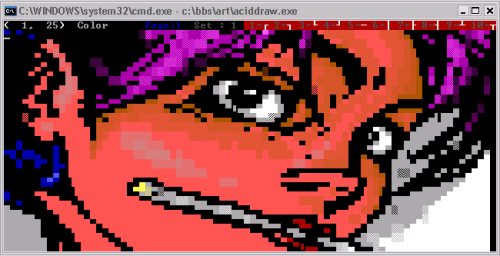
ACIDDraw With a 8 x 12px Font

This looks okay, pretty good even, at a glance. If you drew that picture, however? Especially if you might have struggled to get the proportions just right in the first place? It’s terribly, freakishly squashed! Just compare it with how it looks with a 8 x 16px font:
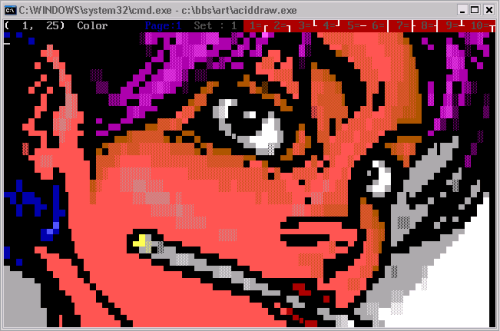
ACIDDraw With a 8 x 16px Font

You’re on board, aren’t you? So let’s fix this! When you go to the properties of a running CMD.EXE you’ll see a handy tab labeled “Font”. Therein is a list of TrueType fonts which, when clicked, allows you to pick a font size. There’s also a “Raster Fonts” section which when clicked will show you a number of bitmap font options listed by pixel sizes, including the default we’re currently using, 8 x 12. So, easy to solve right? We just change to the size we want, or maybe pick a better TrueType font and… err. I’m sure almost everyone reading this had made it this far on their own at some point in the distant past, only to discover that there isn’t any better looking raster font and the TrueType font list is missing almost all of the fonts you have installed on your system. How helpful. It’s at this point most of us would give up and resign to a life of living with these new, weird proportions.

It doesn’t have to be so! I won’t re-write the book as how to add “custom fonts” to your CMD console since it’s well documented all over the Internet. Google if you need more help than I give you here. In short, there are two basic ways to do this:

  1. Install one or more 8 x 16 raster fonts. These will automatically appear in the CMD.EXE raster font list (only listed by their pixel size) after being re-launched.
  2. Install one or more properly proportioned TrueType fonts. Unfortunately this method also involves having to go to “HKEY_LOCAL_MACHINE\SOFTWARE\Microsoft\Windows NT\CurrentVersion\Console\TrueTypeFont” in your registry and adding a new string value representing the name of the new font. Still, after that one tiny change, it should appear in your CMD.EXE’s font list after relaunching it.

Using a raster font is easier, but the advantage of using a TrueType font is that you can then use the “font size” to scale the font (well, the whole window) to a larger size.

Some of the more astute readers might have noticed that the proportions still wouldn’t be exactly correct, since 8 x 16 has a slightly different aspect ratio than 9 x 16. Again, Part 2 is going to be all about aspect ratios. Still, the short response to that concern is that you can actually install a 9 x 16px font the same way we installed the 8 x 16px font above if you really want to re-live the old days or are just a stickler for accuracy.
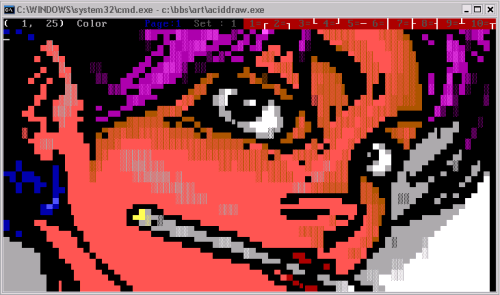
ACIDDraw With a 9 x 16px Font

Of course, there’s the matter of which fonts to actually use. There are a number of good monospaced fonts that look pretty appropriate (or at least, pretty cool) and some even include the high ASCII characters needed for displaying ANSI art fairly accurately. Personally, I’m using the ones included in The Ultimate Oldschool PC Font Pack. This includes fonts from a number of old PC BIOSes lovingly converted to CP437 raster and TrueType fonts. The ones you probably want to install being “IBM VGA8” and “IBM VGA9”. Check out the awesome documentation for the font pack over here for a lot more technical details on the included fonts and some of the topics discussed here.

Definitely an improvement, right? Right. So now your text mode programs all have the right font and the right proportions! Err, not so fast!


1. tk-disto.ans by The Knight and Filth from Fuel #12 (1997)
About Me

“What in the hell is a JACKPHLA?”

Good question. First, it’s JACKPHLASH. See the clever thing I did with the .SH domain name there? 🙂 Jack Phlash is the pseudonym (we most often called them “handles” like we were driving big rigs or something) that I’ve used in the computer underground scene from the mid 90s on. How I ended up with such a stupid name will probably be the subject of a future article.

“Oh, right. Ummm… should I have heard of you?”

Well, probably not, but if you were around the underground scene, particularly the parts of it centered around BBSing, back in the 90s, it’s possible you’ve come across my name here and there. We might have even been chums.

Maybe this will shake a few cobwebs loose:

In the mid 90s I got my big break in the world of textmode art by joining the legendary Creators of Intense Art (CiA) as an ASCII artist. I stayed on with CiA for quite a while, even helping found and run its breakaway ASCII division, Hazmat, for a while. I’ve also sought recognition in the more euro-centric ASCII scene as a member of such ASCII only groups as Serial and Impure, and more recently Break, and while my style has never been all the rage, I think I’ve slowly built a good reputation for myself over the years.

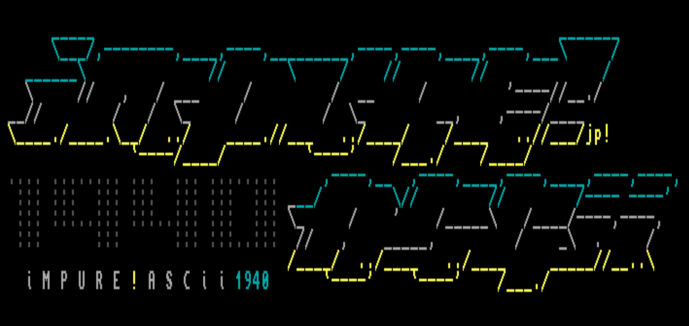
Impure!ASCII by Jack Phlash

I’ve dabbled in a little of most of the art scene related art, a little tracking (music) here and there, some lit (writing) RIPscript art, and yes, ANSI. Despite beating my head against the function keys for years, I’d hardly consider myself much of an ANSI artist, with most of my proudest ANSI achievements having been in more recent years with groups such as Crisis, Roots, and currently Blocktronics.

In the case of textmode art, I’ve used the signature and file prefix of “jp” and “jp!” with the latter becoming my norm these days to make it a bit more distinct since I’m not the only “jp” out there (shout out to j33p33!) If you look you can find my stuff all over the place, and some of it is even decent! I need to put a collection or at least a curated gallery together one of these days, but for now my tag page on 16colo.rs is good enough, only missing a couple of notable pieces.

Many other people probably know me better from my involvement in the BBS modding scene which is really where I first got my start. I’ve been in tons of groups, such as TRiC, Thought Surfers, FSW, Project-X, Sinister, Taura, and finally, I founded Demonic Productions in 1997, which I ran for quite a few years, with quite a number of awesome members releasing awesome mods and programs I’m proud to have had our name on. Good times!

AEON!ASCII by Jack Phlash

Returning to the art scene for a moment, I’m most well-known in some circles as being one half of the legendary Gutter, an ANSI focused e-mag released in the late 90s that, for a brief moment in time, was easily the most popular e-mag around.

Given my growing connections in the BBS scene, I was also involved with many other groups and developers, working on testing software such as Impulse, Iniquity BBS, Instinct, and Illusion BBS. Hmph… that’s a lot of Is! I worked on putting out my own bug fixes (including a much needed Y2K fix) for Iniquity, and have been involved with various attempts to revive or remake it over the years. I’ve also been a supporter of Mystic BBS since the relative early years of its development, running one of the first (if not the very first) highly customized art scene style boards running Mystic, and I still very much support it today.

Speaking of my BBS, I run a bulletin board system called Distortion which has been around in one form or another since the mid 90s, and has been online almost consistently since 1999. It’s had its ups and downs, but for awhile it was likely one of the most active scene-related telnet boards out there. You can check it out @ telnet://d1st.org

As an extension of my efforts with Demonic, I co-founded an underground focused Fidonet style echomail network called Zer0net (or The Zero Network) in the late 90s which was focused on, get this, leveraging the powers of the Internet for “mailing” packets around. Ooooh! Even more amazing, somehow it’s still around today, some 20 years later. Whether I’m a stubborn bastard who refuses to quit, or I just managed to automate things to the point that I didn’t need to expend any effort on keeping it going is still very much up for debate.

Finally, a lot of non-underground scene BBSers probably know me best by the Legend of the Red Dragon style door game I released in the early 2000s, Darkness. Darkness was, in some ways, the culmination of my involvement in the BBS scene, and while it’s one of my prouder moments, I rewrote and relaunched it as Darkness 2.0 in early 2020 in order to leave something I can be a little bit prouder of behind in my wake.

There’s plenty more I’ve done or been involved with that’s not really worth naming dropping – groups I was a member of but never had any output with, wacky hacking and phreaking zines that no one ever read, my efforts to try to archive underground scene related files, etc. It seems that I was quite prolific back in the day. Then again, maybe you just know me from the fact that, like most of us back then, I practically lived on IRC?

For everyone else, the short answer is: I’ve done a bunch of unimportant stuff. Check out the “Egomania” tag for articles that are more biographical in nature, if you’re interested.

“That all sounds nifty. Where do I sign up?”

You’re in luck – right here! While I’ve never completely ceased my involvement in the scene, my output has been anemic since those nostalgic nights as a teenager staying up too late, peering into a tiny CRT monitor and dreaming of making a name for myself in the scene. This blog is an attempt to address that, just a little.

I’ll be using it to recapture some of those days gone by with personal recollections of projects I was involved with, and other related anecdotes, as well as deep dives into the nostalgic days of DOS prompts and dial-up modems by digging into old programs and hooking up with old acquaintances. I’m also planning on using this blog as the place to keep those who are interested updated on some of the projects I’m still involved with, such Distortion, Zer0net, and Darkness 2.0. Finally, I’m going to try to give back to the scene a little bit by documenting my modding and coding projects in the form of “howto” guides. I can’t make any promises of how often I’ll add new content, but with the publishing of this first entry, I’m committing!

“Awesome. What’s a BBS?”

NO CARRIER

But seriously, until I can put together my own series of compelling articles on introducing a lot of these subjects, here and here are a couple of nicely written overviews of the dark ages before the Internet took over. If you want even more, maybe give The BBS Documentary a watch.


1. jp!imp54.ans by Jack Phlash from Impure #54 (2017)
2. jp!aeon1.ans by Jack Phlash from Blocktronics: Space Invaders (2013)