Distortion Improvement Project (2020)

Summer is here and change is in the air. I’ve just completed a lengthy list of, for the most part, long overdue updates and changes to my BBS, Distortion. While realizing my task list was growing quite long, I jokingly dubbed it the “Distortion Improvement Project”… and here we are. Yeah, I realize I’ve yet to really post much about Distortion here, and I’ll correct that soon enough, but the chronology of this blog comes down to wherever my mind is at the time, and you should know I struggle with ADHD. 😉 While this information is mostly only interesting to Distortion users (and I know there’s a few of you reading this blog!) I’d also like to document the process of doing some of these changes, particularly the modding work, so if anything in this list jumps out as interesting to you, please leave a comment or drop me a line some other way and I may accommodate you in a future post.

D1st by Radman and Mattmatthew

  • SSH is now available to all users on TCP port 22. SSH is gated back into telnet over Distortion’s local network so that door games and other externals will still work properly. Viva la encryption!
  • Replaced our locally hosted fTelnet terminal to use the latest embedded, hosted version. You can access this via http://d1st.org if you’re ever in a spot where you don’t have a good ANSI capable client around.
  • Added Mystic’s spellchecking functionality to our full screen editor. Auto-suggest is not turned on but you can always manually view suggested words by hitting CTRL-W over a misspelled word. Now you illiterate bastards have zero excuses. 😉
  • Added Mystic’s draft message feature to the message menu. This is just too damn useful not to have on. Try it with “D” from the message menu next time you find yourself disconnected in the middle of a huge message.
  • Private messaging is now available on the inter-node menu (after previously only being an option after receiving a node message from someone else for years. Kind of a dumb oversight, I admit.)
  • While we’re adding nifty Mystic features, I’ve finally caved and added some long, long requested convenience features as what I’m calling the “modern” theme vs the “classic” Distortion theme:
    • Scrolling ANSI/bulletin viewers
    • Lightbar file and message area selection
    • Lightbar/ANSI message reader
    • Lightbar message index viewer
    • Lightbar file lister
    • Lightbar archive viewer

    Distortion by Firestorm

    Everyone will start out in “classic” which should work more or less the same as you’re used to, but you can toggle your theme or enable and disable specific pieces of this via the “J” option under the user configuration menu.

  • While updating bulletin files to work with my new bulletin viewer, I’ve made numerous updates to them. nothing too exciting, but worth mentioning. I also removed some old bulletins from the extended bulletins menu (which has been redesigned) and added local game scores.
  • Speaking of games, I’ve made several changes to our doors:
    • Legend of the Red Dragon has been reset!
    • Legend of the Red Dragon also has the Barak’s House IGM now. Woot!
    • Legend of the Red Dragon 2 has also been reset!
    • Planets: TEOS has also been reset, and boy did it need it. blah.
    • Planets: TEOS has had the landfill IGM added to it.
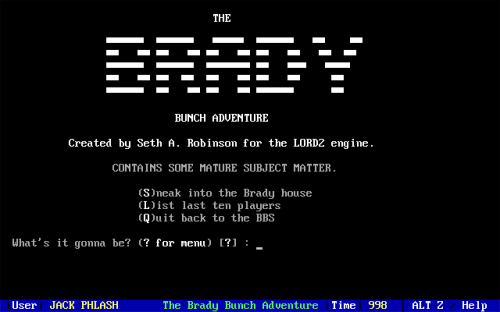
    • I’ve added The Brandy Bunch Adventure mini-game (via REFDoor.)
    • I’ve removed Darkness 1.0b and replaced it with direct links to the Darkness 2.0 games hosted by DoorParty and BBSLink.
    • I’ve removed the BBSLink submenu and replaced it with a link directly into BBSLink’s own menu.
    • The Darkness testing link has been changed – it will now run Darkness directly out of my development directory, though it will only be made accessible when the release of a new version is impending (otherwise you’d need to deal with me resetting the data files all the damn time, which would get seriously annoying.)

    Apologies if anyone was actively playing any of those games, but I’m going to be joining each of them now that they’re reset, so if nothing else maybe we’ll get some new blood in them.

  • SciNet and ArakNet message networks are now publicly available. We’d been members of SciNet long ago before Netsurge’s return, but left it private after getting back on it. Likewise, I’d left ArakNet private while working out some kinks. Check them both out – both are great message networks!

    Sorry if your new message scans get flooded with new messages in these echos – I’d recommend manually resetting your new scan date after you scan the old areas.

  • I’ve removed the old mandatory announcements message area and replaced it with a news bulletin reader mod. You can choose to mark the news as read and it won’t show up for you again until the next time the news file is updated. Note that the display of the news reader will be affected by your bulletin viewer theme settings.
  • Numerous artwork changes:
    • I’ve added some new screens here and there, such as additional welcome and goodbye screens, a second user stats screen, etc. The two pictures on this article are two of the newly added screens. The ASCII by Firestorm is perhaps one of the oldest non-Filth pieces we have, while the logo is a much newer joint featuring Radman of ACiD fame. How many people have ANSIs drawn by Radman?! Too cool.
    • Also, even though few telnet/SSH terminals have major issues with end of line wrapping nowadays, I’ve teleported back to 2001 and removed the 80th column from a few screens that still had it. Rejoice, mTelnet users! 😛
    • To balance that out, I also extended numerous menus and other screens from 23 to 24 lines, most notably, the original long lost 24 line version of our matrix has been discovered and re-implemented!
  • Numerous minor changes to the new user creation process, including a welcome email replacing the old mandatory message, and a new screen with advice on appropriate ANSI-BBS compatible telnet/SSH terminals.
  • Finally, and perhaps least significantly, our original address from 20 years ago “distortion.demonic.net” is back online. Why? Because why not?

There’s more coming, but that’s it for this batch of changes. Enjoy!


1. rad2m-hotmess.ans by Radman and Mattmatthew from Blocktronics: Acid Trip (2013)
2. fm-dstr.asc by Firestorm from ACiD Acquisition #54 / Remorse #7 (1997)
Introducing REFDoor

I had several sources of inspiration when working on Darkness 2.0’s simple “DRS” scripting language, from some specific dialects of BASIC to good old MS-DOS Batch. In the end, it most closely resembles a combination of the Exitilus Quest Scripting language (EQS) and RTSoft‘s “REF” scripting language. Syntax aside, REF was definitely the bigger influence in even coming up with a scripting language in the first place, as it might have been my first real exposure to the concept.

I first stumbled upon REF back in 1995 when I randomly nabbed a copy of RTReader version .02, likely from Seth Robinson’s BBS itself. RTReader was a standalone interpreter door for REF, Seth’s own proprietary scripting language. The archive included a single script called “The Bloody Claw Newsletter” which included some updates from Seth on the state of RTSoft and some other random stuff. Most appealing of all, it was filled with Seth’s infamous brand of humor. As a huge Legend of the Red Dragon fan, I was captivated and eagerly awaited the release of the next issue. I also ended up taking a look at the included documentation and, while I remember being impressed, I was mostly puzzled about why someone would put so much effort into such a complicated engine for a relatively simple program. Of course, when Legend of the Red Dragon II: New World was finally publicly released a couple of years later I learned that the game was almost entirely scripted using REF, with RTReader itself likely morphing into LORD 2’s engine at some point. Very cool.

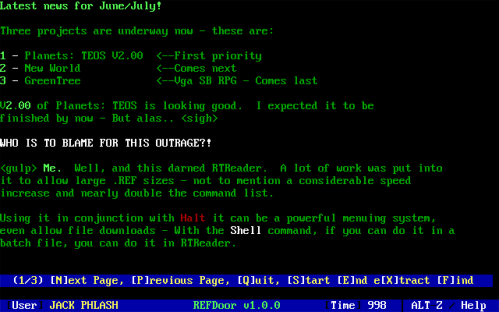
The What's New section of RTNEWS02.REF running in REFDoor

Despite the immense popularity of Seth’s other BBS doors, it seems that relatively few people are familiar with RTReader. While I’ve worked with quite a few similar scripting languages since then, I never forgot about it myself, and when trying to decide what DRS would look like, I dusted off the original RTREAD02.ZIP archive and reacquainted myself with the documentation. With Darkness 2.0 finally released and the nascent version of DRS out in the wild, I found myself thinking back to REF, and wondered if I could implement a scripting language like REF in the same way I had coded DRS’s interpreter.

You see, when coming up with DRS, a core concept was to keep it as simple as possible, both for creating new events with, but also in respect to how I’d implement it – I didn’t want to spend forever on what I knew would be a seldom used side feature, for one. What I ended up doing was interpreting DRS script files in “real time” parsing the file as I read it, line at a time. Most similar interpreters would instead load the entire script into memory, allowing for much faster and more dynamic access to the code. Of course, I ended up having to include some interesting little tricks to get things like hopping to labels that were defined earlier in the script file working, for instance, but in the end it all worked quite well.

So, with REF on my mind, I tossed around the idea of expanding DRS to be more REF like, or replacing it with REF entirely. I even pestered Seth to see if he had the rights to release RTReader’s source code (if he even still had it) so that I could peruse it, curious about how he had handled memory management since this would be the biggest single difference in our interpreters. Still, my original question lingered, could I do something like REF the same way as DRS?

Yes. Yes, I could!

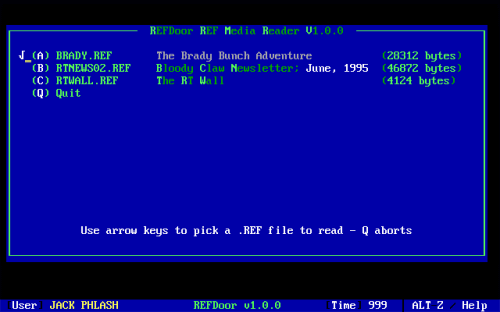
REFDoor's built-in REF Picker Menu

Starting in September 2019 I worked sporadically on writing my own REF interpreter based on my Darkness 2.0 DRS code. Of course, I had to reverse engineer the entire thing – relying on a combination of referencing Seth’s original RTReader and LORD 2 REF documentation, numerous publicly released script files, and good old fashioned observation of how RTReader actually behaved which, quite often, wasn’t exactly 1:1 with what was documented. I did end up occasionally looking at the (incomplete) source code that Seth graciously released, as well as Rick Parrish’s LORD 2 clone‘s source code, but given the constraints of my goal for this new interpreter, I couldn’t exactly rely on either for much more than solving the occasional mystery. It ended up being a fairly large project by my standards (I did end up taking a solid 4 months off from the project right in the middle of it, in my defense) but getting RTWALL.REF and soon after RTNEWS02.REF (the aforementioned Bloody Claw Newsletter) to interpret 100% accurately in March were huge milestones that kept my momentum going decently from then on.

I ended up adding quite a few of LORD 2’s enhancements to the language, and even some of my own, while maintaining 100% backwards compatibility with RTReader. After emailing Seth for permission to include his original archives and him mentioning his LORD 2 REF based mini-game The Brady Bunch Adventure, I also added some additional LORD 2 compatibility to get it (mostly) working properly as well. In the end, I hope this release comes across as fairly polished – I put a lot of care into the features, the accuracy of their functionality, and the documentation.

Download v1.0.0 of REFDoor!

REFDoor is based on the usual XDoor 3.x door kit I use, meaning it’s available in a 16-bit MS-DOS FOSSIL friendly version, as well as a 32-bit Window DOOR32.SYS version. Both builds, as well as all of the aforementioned RTSoft REF scripts, are included in the archive. A big thank you to Seth for allowing me to include them!

The intro screen from BRADY.REF running in REFDoor

Keep in mind that if it’s not obvious by now, this was mostly a project I did for my own selfish purposes, so it’s practical uses are somewhat questionable. That being said, I do think some SysOps and/or developers might be able to make some good use of it – it would be a fairly effective way to make quick, custom doors for BBS software with limited built-in modification capabilities, for instance. Hey, if nothing else, you can easily setup The Brady Bunch Adventure on your 64-bit Windows BBS using it!

So, beyond that? Well, I’m still toying with the idea of adding REF functionality into Darkness 2.x for event and/or IGM creation. I’ve also started doing some prototyping on a new door game that would use REFDoor as a foundation, similar to what Seth did with LORD 2. Who knows for sure, but I had a lot of fun working on it.

You can read a little more on everything else mentioned here in the REFDoor documentation included in the archive if you somehow haven’t read enough already. Enjoy!

As a side note, the only version of RTReader I’ve ever seen is version .02, and it includes The Bloody Claw Newsletter Issue #2. Does anyone have or even know of the existence of an earlier (or later) version of RTReader and/or other issues of The Bloody Claw Newsletter?! If so, contact me!


1. The “What’s New At Robinson Technologies” section from The Bloody Claw Newsletter Issue 2
2. REFDoor’s built-in REF picker menu, which apes the look and functionality of RTReader
3. The introduction screen/menu from The Brady Bunch Adventure

Getting into Amiga – Choices

Introductions out of the way, this whole adventure started in earnest when I saw a post of a local retro computer Facebook group. One of the members was parting with his upgraded Amiga 1200. It looked to be in great condition and included most of the standard upgrades, such as a CompactFlash card-based hard drive, a Gotek floppy drive emulator, and an Indivision scan doubler. The price seemed pretty reasonable, all things considered, and an upgraded A1200 is pretty much the ultimate Amiga in my mind, so I was very tempted. Unfortunately, someone else had been quicker on the draw and already called dibs on the purchase. I watched the comments on the post for a week hoping the original poster would announce that it was still available but alas, no such luck.

This got me thinking more and more about finally getting an Amiga of my own to play with, which led to multiple deep dives into Amiga forums and groups. Thanks to my interest in retro computing I already had some familiarity with the awesome things people had been doing in the Amiga scene for the last decade or more – insane modifications like the Vampire series of FPGA based accelerators, for instance. Of course, there were also numerous other emulation options as well. The more I looked, the more options it seemed I had to choose from.

Joe Decuir

First and most obvious, acquiring an actual Amiga. There seemed to me to be a disconcerting number of challenges involved in collecting real vintage Amiga hardware, including the limitations of the stock hardware from the era, like having to rely on floppy disks, the seemingly bottomless money-pits that are collecting and aftermarket modification, the availability of this stuff here in the US where Amigas are far less common, worrying about exploding capacitors, smoking power supplies, and other issues related to the relatively ancient age of the hardware, the physical space being at odds with my recent efforts to downsize into my modest apartment, NTSC vs PAL issues, and a host of other video output concerns – I certainly didn’t want to have to track down a compatible CRT monitor, and much, much more. All in all, I decided to take getting a real Amiga off of the table.

The next option was hardware emulation. I haven’t ever messed with any of the newer FPGA based computers, though I attended a retro computer festival in my city last year and the MIST FPGAs as well as the newer MISTer FPGAs were fixtures in just about every booth at the convention, emulating various obscure machines to what seemed like a high degree of speed and accuracy. In fact, I attended a talk by Joe Decuir, one of the original Amiga hardware engineers, and he even shouted out the MIST Amiga core during his presentation. I’d heard a bit about them in the past, but I don’t think I ever realized how awesome they were until I saw them being used there.

Using a dedicated FPGA has numerous benefits over real hardware – a relatively tiny form factor, USB input compatibility and scaled VGA output meaning I can use my existing peripherals, swappable SD card based hard disks, “cores” that can emulate not only both older OCS/ECS and newer AGA Amigas, but also innumerable other platforms including the Amiga’s Commodore forebearers as well as its most compared rival, the Atari ST. You can also max out the virtual hardware on any of these platforms, emulating a stock Amiga 1000 running the oldest ROMs and OSes, or a super tricked out Amiga 4000 running newer, post Commodore ROMs and OSes. All in all, aside from being quite far from the experience of using real hardware, the quality of the emulation of the Amiga cores is the biggest concern.

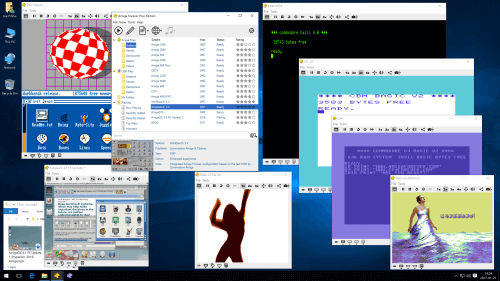
Amiga Forever screenshot

Finally, we have software emulation. WinUAE and its counterparts are all quite mature, which means that not only is emulation and the added modern utility excellent, but there’s also a huge user community out there for support. You also have all of the flexibility in emulation provided by the aforementioned FPGA options, and more. The usability of these platforms is, indeed, incredible. Of course, running a soft emulator on top of a modern OS, on totally modern hardware is without a doubt the most removed from the experience of using a real Amiga.

One middle ground that has gained a lot of popularity lately is building a dedicated Raspberry Pi based Amiga emulator. There’s an excellent UAE based Amiga emulator for ARM called Amiberry which, despite its popularity as a game emulator, can be used for emulating the entire environment. Indeed, there is even an entire distribution dedicated to the cause, Amibian. While you don’t get the other cores or the performance of using an FPGA (or even emulation on a modern, higher end PC) you do get a nice, unobtrusive, dedicated piece of hardware beautifully aping an Amiga.

At the end of the day I decided to go the FPGA route. While the newer MISTer might be a better long term choice with its superior hardware and more active development community, the original MIST’s lower cost of entry, simple operation, and native VGA output won me over, at least for getting my toes wet into the world of FPGAs. I also bought a copy of the latest Amiga Forever, since it seems like a little bit of software emulation can be helpful in supporting any of the above efforts, and, controversy aside, there’s nothing wrong with having “legal” copies of the various Amiga ROMs and Workbench versions it comes with. I’m also still intrigued by the idea of building a dedicated Amibian-based Pi. Given its tiny cost of entry, I think it’d be a fun little project to document here.

So, with that, the journey is off to a start!


1. Joe Decuir is the man. Involved in the Atari 2600, Atari 8 bit PCs, and the Amiga chipset, but also newer technologies like USB and Bluetooth.
2. A stock screenshot of Amiga Forever being used in a totally unrealistic way. Yay!